 ChinaBuddy
2026 Best eSIM for China Travel: How to Compare Plans
Compare China travel eSIMs by coverage, data, activation, device compatibility, hotspot rules, and support before your trip.
IN THIS GUIDE
Plans and prices change monthly · This page compares how to choose, not who "wins"
The best eSIM for China is not the one with the most data. It is the one that fits your destinations, phone and everyday apps, with clear coverage, activation and support terms.
Start with your route, the apps you actually use and whether you need hotspot sharing. A mainland-only package can stop working on a Hong Kong side trip; an unlimited plan can still cap tethering; and a Google-friendly plan may not cover your AI or TikTok needs. Match those requirements first, then compare the price for your full trip.
The 30-second answer
Ask Buddy ↗| Your trip | What to buy | Why |
|---|---|---|
| 3–10 days, cities only, you need Google, WhatsApp and maps | Travel eSIM that explicitly supports your apps in mainland China, normally using an overseas data route | Coverage and gigabytes alone do not establish app access |
| You also rely on AI assistants or TikTok | Shortlist packages naming your apps or offering broader AI/TikTok support, then check the detailed app list | Google support alone does not establish Claude, Gemini, ChatGPT or TikTok support |
| 1–4 weeks, heavy photo uploads, you tether a laptop | Unlimited or large-data plan, after checking the hotspot allowance | "Unlimited" often means unlimited on-device with a small daily hotspot cap |
| 2 weeks or more, or you need a Chinese phone number for deliveries and bookings | Local SIM from China Mobile, Unicom or Telecom, bought in person with your passport | Gives you a Chinese number and local rates; requires real-name registration |
| Multi-country Asia trip, or a Hong Kong and Macao add-on | Regional or multi-region eSIM that explicitly covers every stop | Mainland China plans frequently exclude Hong Kong and Macao |
| Work calls you cannot miss | Your home carrier's roaming as a backup, plus a travel eSIM as primary | Two independent paths, ideally with different exit countries |
If you only read one more section, read routing and app access. They matter alongside coverage and data allowance.
What your data route decides
Ask Buddy ↗Every eSIM behaves in one of two ways in China, and the difference is invisible on the box.
Route A: data leaves the mainland. The plan uses an overseas data route, often through international roaming. This can make overseas services reachable, but it is not a guarantee for every app or account, and performance varies. Some plans instead bundle a VPN with domestic data, which is a different mechanism with its own conditions.
Route B: data stays domestic. The plan gives you a domestically routed connection. Chinese apps generally work normally, but services such as Google, WhatsApp, Instagram, YouTube and X are normally unreachable. Both domestic and roaming plans can use China Mobile, Unicom or Telecom for the radio connection: the displayed network name does not tell you the data route.
There is a second, less obvious layer: where a service is available and who can use it. The data exit country can affect access, but it is not the same as your location or account eligibility. See the next section.
Two plans can both say "China, 20 GB, 30 days" and behave in completely different ways. Providers rarely label the distinction clearly, and it can differ between two products from the same brand.
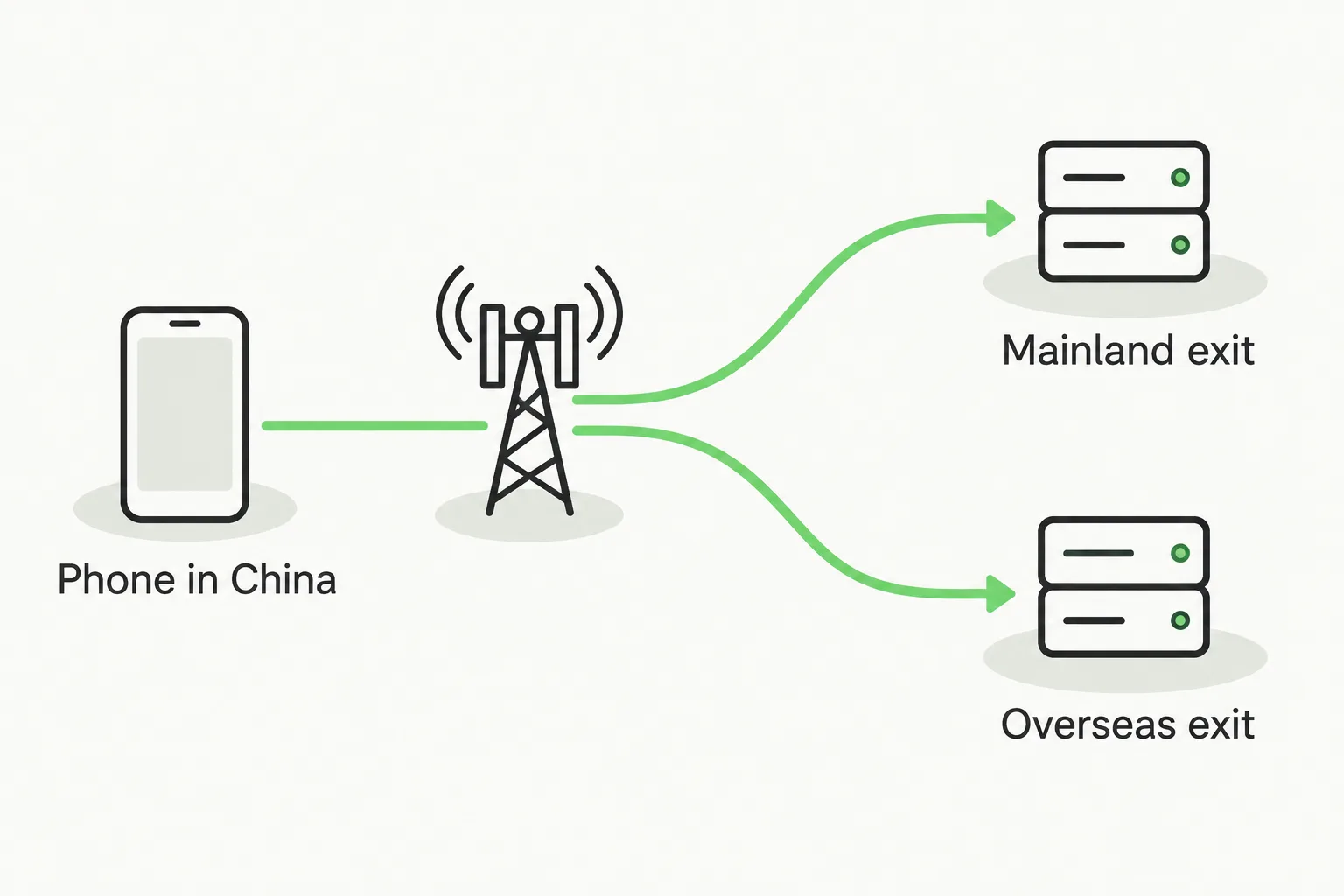
China eSIM routing, illustrated: mobile signal alone does not reveal the data exit country. Confirm the exact plan's exit country and the regional and account requirements of the services you need.
How to confirm before you pay
Ask Buddy ↗Start with the exact package's description and usage instructions. If they already answer these questions, you do not need a support conversation:
- "Does this plan's data route through mainland China or outside it?"
- "Which country does the traffic exit from?"
- "Does this exact package support the apps I need, and is any extra software or setup required?"
- "If it does not work on arrival, what is the refund or replacement process?"
A listing or support reply that only says "stable network, 5G, best coverage" has not answered the app question. Name the apps that matter to you, whether that is WhatsApp and maps, a particular AI assistant, or TikTok. If the package already clearly covers them, move on to allowance, validity and price.
After arrival, turn Wi-Fi off and test a local website, your maps app and the messaging service you actually need. This checks whether those tasks work at that moment; it does not identify the exit country or diagnose a failure. If nothing loads, first check activation, the selected data line, remaining allowance and the provider's APN/roaming instructions. If only one app fails, check that service's status and regional/account requirements. A country-related error does not establish a particular exit country.
If a local site works but Google does not, domestic routing is one possibility; an app outage, DNS problem or partial network fault can look similar. Ask the provider to confirm the route of your exact package before paying for a replacement. If neither loads, start with the connection checks rather than the routing assumption.
IMPORTANT
A travel eSIM is not a legal workaround, and this guide does not recommend circumvention tools. Rules on VPN use and on which services are reachable can change without notice. If a specific service is essential to your trip, treat access as a risk to plan around, not a feature to assume.
Match the package to the apps you use
Ask Buddy ↗Choose for your own app list, not the biggest badge. For maps, WhatsApp and occasional browsing, a package clearly supporting those tasks may be enough. If you also need Claude, ChatGPT, Gemini or TikTok, compare that support before comparing gigabytes.
Trip.com's China listings include packages naming Google Maps and ChatGPT, and others labelled "All AI & TikTok". They are different products, not a promise that every eSIM on the platform has the same capabilities.
| Wording on a package | How to use it when shopping |
|---|---|
| Google or WhatsApp supported | A useful shortlist for browsing and messaging; do not infer support for other apps |
| Google Maps / ChatGPT supported | A stronger match if those are your apps; check Claude or TikTok separately if you use them |
| All AI & TikTok | Start here for broader needs, then check which AI apps and functions the description actually names |
| 5G, unlimited or multiple networks | Compare speed, allowance and coverage; these labels do not answer the app-access question |
Check the selected package's description and instructions, not just its title. Look for exclusions, extra-software requirements and recent reviews mentioning your apps. A ChatGPT claim does not automatically cover Claude or Gemini; TikTok also uses SIM-region and device signals, so an overseas IP is not the whole answer.
Use the exit country as a supporting clue. If AI access matters, a documented Singapore or Japan route is a useful shortlist criterion; Hong Kong routing alone is not enough evidence. Prefer a clear promise about your exact apps over a country label with no app details. Each app has its own regional and account requirements, so a seller's claim is not a guarantee for every account.
If anything essential is unclear, ask: "I need WhatsApp, Claude and TikTok in mainland China. Does this exact package support them without extra software, what setup is needed, and what help or replacement is offered if they fail?" Substitute your own apps. No support conversation is needed when the listing already answers this.
For a 12-day mainland-plus-Hong-Kong trip, compare packages covering both regions for at least 12 days and your required apps. A cheaper mainland-only or Google-only option is a poor fit if it misses one of those needs. Then compare data, hotspot and total price. After landing, test the tasks themselves: send a message, get an AI response or play a TikTok video, as relevant. A failure calls for troubleshooting, not an automatic second purchase.
Will your phone actually work
Ask Buddy ↗eSIM support depends on the exact model and the region it was sold in, so check the device, not the brand.
- Unlocked. A carrier-locked phone cannot install a third-party eSIM.
- An EID exists. On iPhone: Settings → General → About, look for EID. On Android: dial
*#06#and look for an EID alongside the IMEIs. No EID means no eSIM. - The model is on the provider's list. Check your exact model, not "iPhone 15" as a family.
- Dual SIM behaviour is understood. A travel eSIM normally runs alongside your home line: set the travel eSIM as the data line, keep the home line active for bank and login codes, and turn data roaming off on the home line so you do not pay for background data.
Two habits save money and grief. Install the eSIM at home on reliable Wi-Fi, not at the arrivals hall. And never delete the eSIM mid-trip: most travel eSIM QR codes are single-use, and a deleted profile usually cannot be reinstalled without buying again.
Apple publishes a country-by-country list of carriers and providers that support eSIM on iPhone, which is the fastest way to check whether your home carrier offers a China roaming eSIM at all.
Compare the real cost, not the headline price
Ask Buddy ↗| Dimension | Why it changes the trip | How to check |
|---|---|---|
| Validity vs. trip length | A 7-day plan bought for an 8-day trip expires a day early; top-ups may cost more than a longer plan | Count door-to-door days, including arrival and departure |
| Data type | "Unlimited" plans often throttle after a daily threshold, or block hotspot entirely | Read the fair-use section, not the marketing headline |
| Hotspot allowance | Tethering is the first thing cut; some plans allow 1 GB per day, others none | Search the plan terms for "hotspot" or "tethering" |
| Routing and app access | Google, AI assistants and TikTok can have different requirements | Match the selected package to your own app list |
| Network partner | China Mobile has the widest rural coverage; Unicom and Telecom are strong in cities | The product page usually names the partner network |
| Coverage on your route | A plan sold as "China" may exclude Hong Kong, Macao and Taiwan | Check each destination separately, including day trips |
| Activation and top-up | Some plans start counting at purchase rather than on arrival, and running out mid-trip with no top-up path means buying again | Buy close to departure if the clock starts at purchase; confirm top-up accepts a foreign card |
| Refund and support | A dead eSIM on arrival is only recoverable if support answers in your time zone | Check support channels and refund window before buying |
| Number or data-only | Most travel eSIMs are data-only: no Chinese number, and some services require one | Confirm whether incoming SMS is supported |
A fair comparison divides total price by usable days, then by realistic data use, then adds anything you must buy separately: a VPN, a second plan for Hong Kong, or an AI-friendly backup line. The cheapest sticker price is often the most expensive trip.
Five providers worth comparing (October 2026)
Ask Buddy ↗A starting shortlist, not a ranking. Three entries carry detail verified on the provider's own product page; for the rest, run the four questions above before buying.
| Provider | Verified detail | What to confirm |
|---|---|---|
| Holafly | China plans state CMCC (China Mobile) as the network, say Google, WhatsApp and Instagram are reachable without an additional VPN, include a VPN, cap hotspot sharing at 1 GB per day, and state that Hong Kong and Taiwan need separate eSIMs | Support for any additional AI or video apps you need, and the hotspot cap on your plan length |
| Airalo | The China local eSIM lists China Unicom as its primary network | Named-app support and routing for the selected plan; a network partner alone does not establish either |
| Trip.com eSIM | Marketplace with separate Google/ChatGPT and broader AI/TikTok-labelled products, mainland-only and multi-region coverage, and daily or total-data options | Exact seller/package app list, extra setup, hotspot, validity and regional coverage; do not compare only the advertised starting price |
| Nomad | Country and regional plans including China | Exit country, network partner, hotspot terms |
| Saily | China plans sold through an app-first flow | Exit country, hotspot allowance, refund terms |
Two notes that matter more than they look. Hong Kong and Macao are usually separate products: at least one major provider states that its China eSIM does not cover them, so a day trip needs its own plan or a multi-region one. And "5G" rarely means 5G everywhere: expect 4G outside city centres, with the weakest coverage on the Tibetan Plateau, in national parks and along rural roads.
Install it, and get online in the first hour
Ask Buddy ↗- Buy 3–7 days before departure, after checking the activation trigger and the exit country.
- Install on home Wi-Fi by scanning the QR code or using the provider app.
- Label the line (for example "China travel") so you do not mix it up with your home line later.
- Set the travel eSIM as the mobile data line before you fly; leave the home line on for SMS codes.
- Turn off data roaming on the home line to avoid background charges.
- After landing, turn off Wi-Fi and wait for activation. Most plans activate on first connection and can take a few minutes.
- Check the tasks you need: with Wi-Fi off, try your maps and messaging; if relevant, send an AI prompt or play a TikTok video. This tests usability, not the exit country.
- Save the support channel and order number offline, in a note or screenshot.
- Keep the eSIM installed until you are home. Deleting it usually ends the plan.
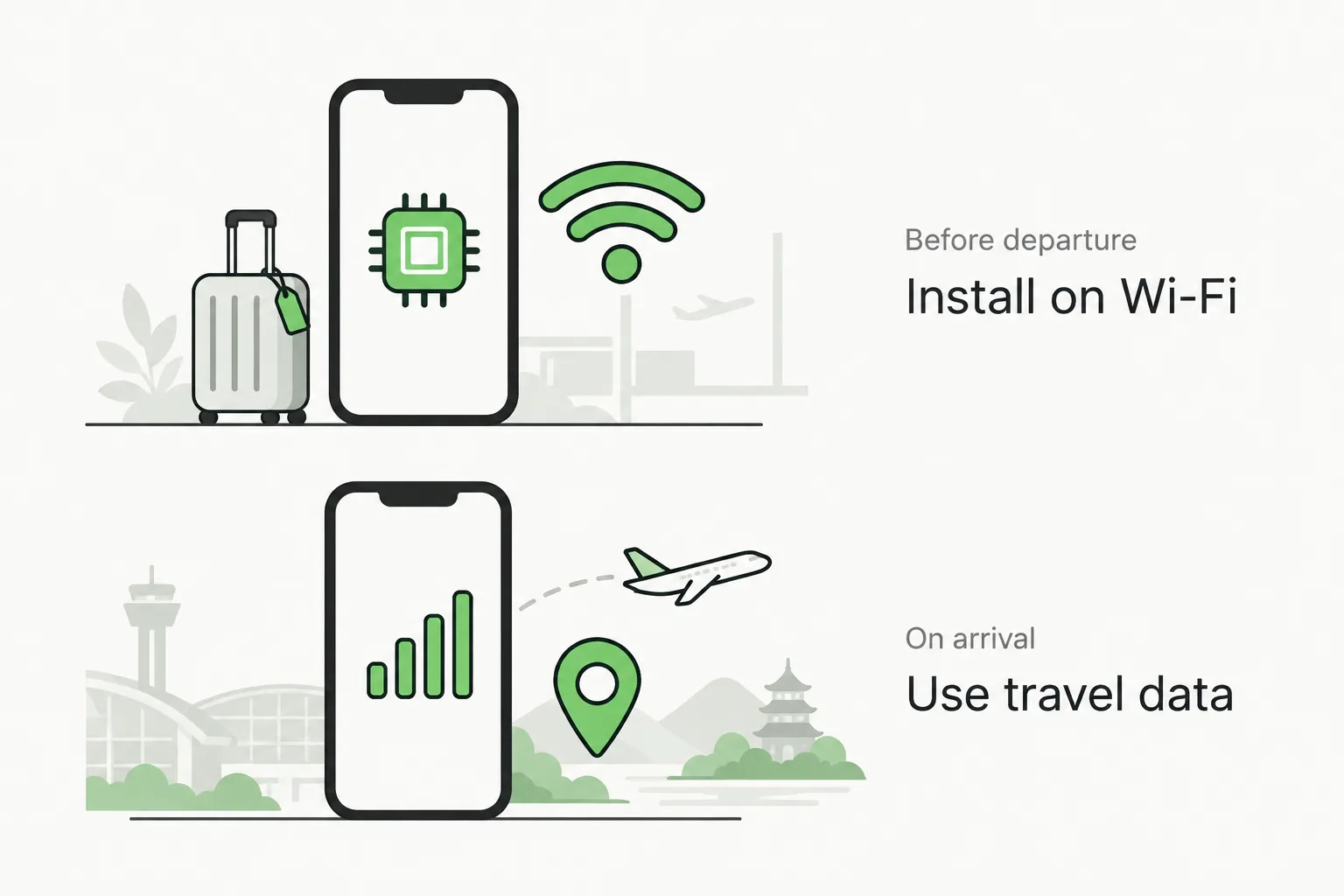
Install your China travel eSIM before departure, then follow the provider's activation instructions on arrival. Some travel eSIMs need data roaming enabled; keep home-line data roaming off.
If nothing works on arrival: confirm that you are inside the plan's coverage area, activation has completed, data remains and the travel eSIM is selected for mobile data. Follow the provider's APN and data-roaming instructions for that line, then try airplane mode briefly or restart. If the problem remains, contact support with your order number and the error. Do not delete the eSIM or buy a replacement just because a website fails. If most apps work but one does not, keep the working connection and investigate that app's requirements and the seller's instructions first.
Optional Trip.com installation tutorial by Chris Tech Guide, an independent creator. Use the installation credentials and instructions in your actual order. Installation and the start of paid validity may be different events; this tutorial does not establish a package's China coverage or app support.
Trip.com eSIM installation and activationOptional video · YouTube
YouTube may not load in mainland China. You can follow the written steps in this guide.
Ask BuddyWhen an eSIM is the wrong choice
Ask Buddy ↗- You need a Chinese phone number. Most travel eSIMs are data-only, and some delivery, booking and mini-program flows expect a mainland number. Buy a local SIM with your passport instead.
- You are staying weeks or months. A local plan is usually cheaper per gigabyte and includes a number, at the cost of real-name registration and a store visit.
- Your phone has no EID or is carrier-locked. No eSIM product can fix that.
- Your work depends on one app always being available. Choose a package explicitly supporting it, check laptop/hotspot needs and keep a backup connection. An eSIM alone is not a guarantee of uninterrupted service.
- You are mostly in Hong Kong or Macao. Buy a plan that explicitly covers them; mainland China plans often do not.
FAQ
Ask Buddy ↗Does a China eSIM bypass the Great Firewall?
It depends on the exact plan's routing and terms, not on the word "eSIM". Some travel plans provide access to services that are normally unreachable on a domestic connection. Confirm the apps you need before buying, then test their usability after arrival; those checks do not prove an exit country.
How do I choose for AI apps such as ChatGPT, Claude or Gemini?
Start with the apps you actually use and shortlist packages explicitly covering them. A broad AI label is a reason to read the detailed list, not proof that every assistant works. ChatGPT and Claude have their own supported-region lists; Gemini has different regional and web/app availability. If you use one assistant, do not pay extra merely for a bigger AI bundle; if you use several, compare support for all of them. See how to read the package labels.
And TikTok?
If TikTok matters, shortlist a package specifically naming it, then check any device/setup conditions and recent reviews of that same product. TikTok uses SIM-region, IP and device information, so a plan working with Google or an AI assistant does not establish TikTok access. Check video playback and, if needed, uploading after arrival; a homepage loading is not enough.
Can I use WhatsApp, Google and Instagram, and do I need a VPN too?
Choose a package that explicitly includes the apps you need and states whether it requires any extra setup. Some providers advertise access without an additional VPN; others bundle one. Follow that package's instructions rather than assuming all travel eSIMs behave alike. VPN use in China is regulated and reliability varies.
Can I keep my own number for bank and login codes?
Yes. Keep your home line active for SMS, put data on the travel eSIM, and disable data roaming on the home line. Incoming SMS while roaming may be charged by your carrier, so check that rate.
Can I share the connection with a laptop?
Only if the plan allows hotspot, and often only up to a daily cap such as 1 GB. Plans that block tethering will let you connect but not pass traffic.
Can I install the eSIM after I land?
Technically possible if the airport Wi-Fi lets you reach the provider, but it is the worst moment to debug a purchase. Install before you fly.
Will I get a Chinese phone number?
Generally no. Travel eSIMs are data-only; local carrier SIMs come with a number and require real-name registration with your passport.
Sources
Checked on 19 October 2026. Provider terms, prices and coverage change frequently; verify at purchase.
- Apple Support: Find wireless carriers and worldwide service providers that offer eSIM service on iPhone. https://support.apple.com/en-us/118227
- OpenAI: ChatGPT Supported Countries and ChatGPT and API services in unsupported countries and territories. https://help.openai.com/en/articles/7947663-chatgpt-supported-countries · https://help.openai.com/en/articles/9131992-chatgpt-and-api-services-in-unsupported-countries-and-territories
- Anthropic: Where can I access Claude? https://support.claude.com/en/articles/8461763-where-can-i-access-claude
- Google: Where you can use the Gemini web app (Hong Kong and Macau listed; mainland China listed as Workspace only). https://support.google.com/gemini/answer/13575153
- TikTok: Privacy Policy, including SIM-region, IP and device information used to estimate location. https://www.tiktok.com/legal/page/row/privacy-policy/en
- Airalo: China eSIM product page (China Unicom as primary network). https://www.airalo.com/china-esim
- Holafly: eSIM China product page (CMCC network; Google, WhatsApp and Instagram reachable without an additional VPN; VPN included; 1 GB per day hotspot; separate Hong Kong and Taiwan eSIMs). https://esim.holafly.com/esim-china/
- Trip.com: China eSIM listings with distinct app-support labels and coverage options, plus a Google Maps/ChatGPT-labelled product example. https://www.trip.com/things-to-do/experiences/china-connectivity-solutions/ · https://www.trip.com/things-to-do/detail/53873746/
- Nomad, Saily: China product pages and help centres, for plan terms and device lists.
- Your mobile carrier: roaming terms and eSIM availability for China.
- Apple Support: About cellular data roaming options for your iPhone and iPad, including roaming troubleshooting. https://support.apple.com/en-us/109037
- Airalo Help: Why is my eSIM not working?, covering coverage, data-line selection, APN and roaming settings. https://www.airalo.com/help/troubleshooting/0UEL63PDK5IJ/why-is-my-esim-not-working/X7ZYBK1S7GA8
No provider paid for placement. Where a claim could not be verified on a provider's own page, this guide says so rather than repeating marketing copy.
- Optional walkthrough: Trip.com eSIM installation tutorial, by Chris Tech Guide.